Introduction
A webapp for making and recording sound to be playable on command.
Set the output device and press a sound effect button to play audio from your speaker or headphones.
How do I record sound effects directly from the computer?
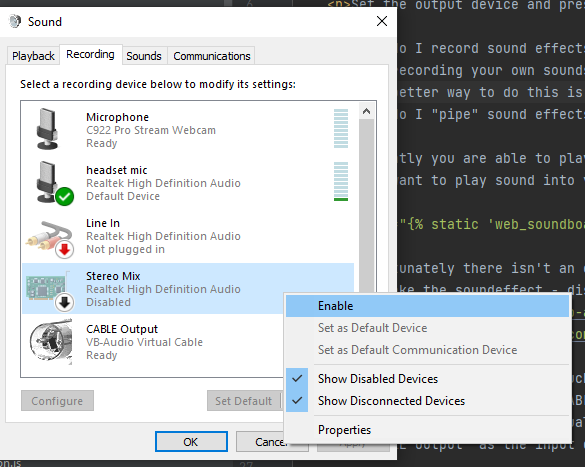
When recording your own sounds you can record audio from your speaker from your microphone but there would be a decrease in the quality. The better way to do this is to record the audio coming directly from the computer by selecting "Stereo Mix" from your input devices
you might have to enable this through the "Sound" options, see below image for examples on windows.
How do I "pipe" sound effects into the microphone?
currently you are able to play the sound effects into your speakers or headphones however my guess is that you want to play sound into your microphone to annoy your discord friends 😈
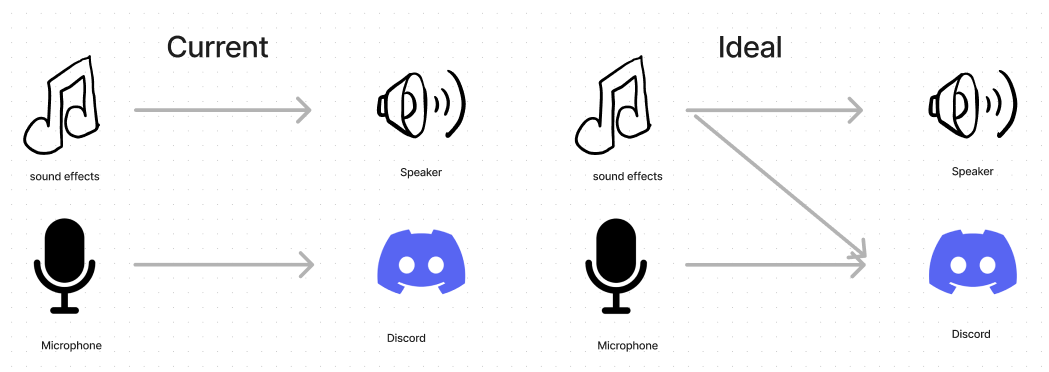
Unfortunately there isn't an easy way to pipe audio into the microphone virtually through the web browser. So there isn't an easy way to make the soundeffect - discord connection (sad 🎻). However, there are 3rd party software that can help you configure your audio input/output such as Voicemeeter and VB-Cable.
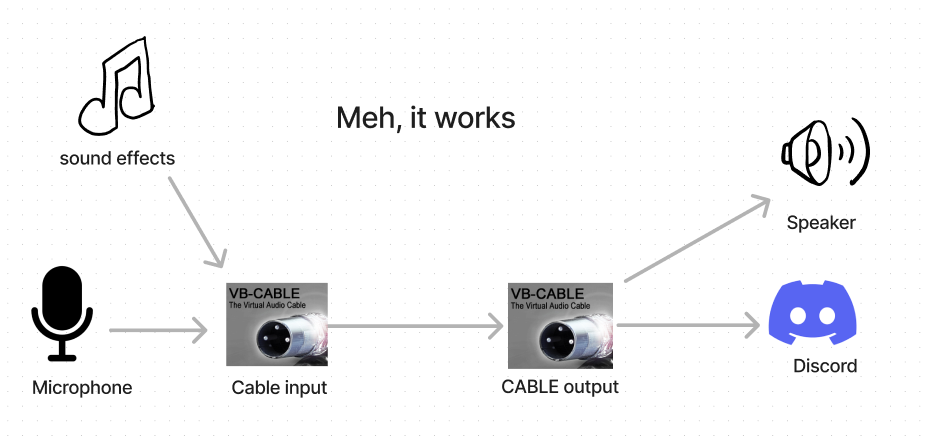
Voicemeeter is a bit too much to get into here but a quick and dirty way of doing this is to install VB-Cable which creates a virtual "CABLE input" and "CABLE output" pair that allows you to pipe audio output device into an audio input device virtually. You can then set output device on the soundboard to "CABLE input" and then set "CABLE output" as the input device in discord.
You can then change the sound settings of the recording device so that microphone is being picked up by the CABLE input and Cable output is being piped into your headphones. However, this will create a feedback between microphone to headphone.